Verified
★★★★★
Awesome device. I use this for all my interviews. Transcription APP is great!
 ×Todu_ka
For content creators and journalists who don't want to miss the first word of an interview or scramble with setup so they can snap, record, and get clean results in seconds.

Based on real creator reviews · Trusted by 2.5M professionals globally
Just snap Plaud Note Pro onto your phone and tap once — you're recording in top quality before the conversation moves on. No app to open, no settings to adjust, no moment lost.
After the interview or meeting, Plaud Note Pro connects to your phone or computer for instant transcription — every word captured, organized, and ready to scan without replaying a single minute of audio.
In just a few seconds you get structured, clear results — pull the exact quote, identify action items, or build your content outline directly from the transcript.
Creator review
Todu_ka demonstrates how Plaud Note Pro transforms a phone into a professional recording tool — snap it on, tap once, and get organized results in seconds.
Creator's vertical video (Instagram Reel)
Todu_ka
Lifestyle creator
Platform
Audience
Content creators, journalists, and students
Scenario tested
Snap-on recording for interviews and spontaneous conversations
"Just snap it onto your phone and record any conversation in top quality."
— Todu_ka, video at 0:55
The problem & the fix
Fumbling for a recorder or unlocking your phone takes too long. By the time you hit record, the critical moment is already gone.
Opening an app, choosing settings, finding the right mode — every extra step is a distraction that pulls you out of the conversation and risks missing what matters.
Manual transcription eats into your productivity. Navigating long recordings makes finding key moments a constant struggle.
Plaud Note Pro magnetically attaches to your phone. One tap and you're recording in top quality — no setup delay, no missed moments.
No app to open, no settings to configure. Plaud Note Pro starts capturing the instant you tap, so you stay fully present in the conversation.
After recording, Plaud Note Pro delivers clean transcripts, structured summaries, and key points within seconds — ready to use for articles, follow-ups, or content outlines.
Choose your AI note taker
Snap-on AI voice recorders for professionals
 Best for meetings
Studio-grade capture for teams and professionals
£169
Shop now Most wearable
Hands-free capture, four wearing options included
£159
Shop nowCreator story
Todu_ka x Plaud Note Pro
As a lifestyle creator, todu_ka often found themselves in fast-moving conversations — interviews, meetings, spontaneous creative discussions — where important details surfaced without warning. The old approach meant fumbling with a separate recorder or rushing to open a phone app, only to realize the best moments had already passed.
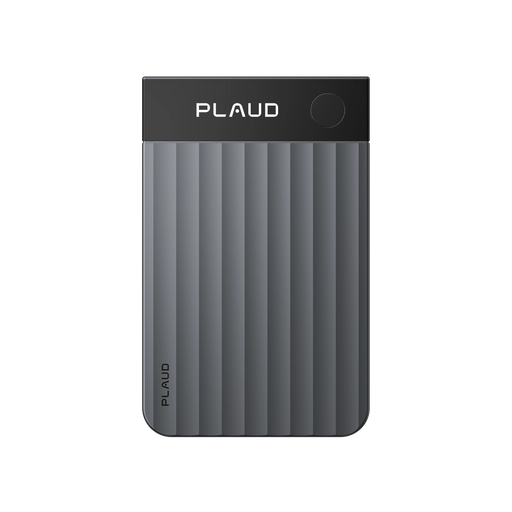
With Plaud Note Pro, the workflow changed completely. Instead of scrambling, todu_ka simply snaps the device onto their phone and taps once. Recording starts instantly in top quality — no setup, no app switching, no breaking the flow of conversation. The sleek, credit-card-sized design fits naturally into any professional setting.
Within seconds of finishing a conversation, todu_ka gets organized, clear results — full transcripts, structured summaries, and key points ready to use. No more replaying hours of audio or manually writing up notes. The content goes straight from conversation to creation.
"Just snap it onto your phone and record any conversation in top quality. You get organized and clear results in just a few seconds."
Todu_ka
Lifestyle creator · video at 0:55
2.5M
Trusted by professionals
112
Languages supported
260 hrs
Saved per year on average
Expert playbook
Follow this step-by-step playbook to capture, transcribe, and utilize every important conversation with Plaud Note Pro.
Prepare your setup so you can start capturing the moment the conversation begins.
Stay present in the conversation and let Plaud Note Pro handle the details.
Review your organized results and turn raw audio into usable content.
Build a searchable library of interviews and conversations over time.
Why Plaud
When every second counts in a conversation, Plaud Note Pro gives you a faster way to capture, transcribe, and use what was said — without changing how you work.
Plaud Note Pro magnetically attaches to your phone and starts recording with a single tap. No apps to open, no menus to navigate — just instant capture so you never miss the first word.
Your recordings are protected with AES-256 encryption, TLS 1.3 in transit, and compliance with HIPAA, SOC 2 Type II, GDPR, and ISO 27001. Sensitive interviews and client conversations stay secure.
Plaud Note Pro transcribes in 112 languages with speaker labels and delivers structured summaries, key points, and mind maps — so you spend time creating, not replaying audio.
Real reviews
See what content creators and professionals say about using Plaud Note Pro for interviews.
Awesome device. I use this for all my interviews. Transcription APP is great!
Fabulous…extremely useful…Light, portable accurate - excellent work tool
The voice recorder and transcription function worked exactly as intended.
Works great so far, appears accurate still working it into my workflow
FAQ
Common questions about using Plaud Note Pro as an AI voice recorder for interviews, content creation, and professional conversations.
Snap Plaud Note Pro onto your phone and tap once — you're recording immediately. There's no app to open or settings to configure, so you can capture the conversation from the very first word.
Users consistently highlight the transcription accuracy. Plaud Note Pro's AI produces clean, readable transcripts in 112 languages with speaker labels, so you can use the results directly for articles, follow-ups, or content outlines.
Plaud Note Pro captures clear, high-quality audio even in less-than-perfect conditions. For best results in noisy environments, keep the device close to the speaker. For larger rooms, consider Plaud Note Pro with its 16.4 ft pickup range and AI beamforming.
Yes. The organized results include structured summaries, key points, and even mind maps, so you can pull quotes, build outlines, or draft articles without replaying the full recording. Export in 27+ formats or connect to Notion and Google Drive via Zapier.
Always get consent before recording any conversation. For interviews and professional meetings, a simple heads-up is standard practice and keeps you compliant with local regulations. Plaud suggests: "Mind if I use my AI note-taker so I don't miss any details? I can share the notes with you after."
Keep exploring
More stories, workflows, and guides
A real-world workflow for staying present in meetings while instantly capturing and transcribing key points.
Explore →See how a fast-paced creator-professional captures spontaneous ideas and turns them into usable notes immediately.
Explore →A practical comparison to pick the best AI note-taking setup for interviews, meetings, and on-the-go capture.
Explore →
Fast Shipping
Ship out within 1-2 business days

Free 30-Day Return
No reason needed. Free return shipping & full refund.

One-Year Warranty
Warranty period subject to local laws

Lifetime Customer Support
Quick support within 24 hours on working days
Before you record, take a moment to let others know and get their okay. Thanks for being mindful of privacy and local laws.
Trending Search

Trending Search
Suggested Searches
Popular Products