Verified
★★★★★
I enjoy the pro model, the transcription onto the app, the summary, the support.
 ×Jsetups
For iPhone-first users who need crystal-clear audio from meetings, calls, and voice memos. This slim device snaps magnetically to your iPhone via the MagSafe case. It does not just record—it transcribes, summarizes key takeaways, and generates mind maps to keep you organized.

Based on real creator reviews · Trusted by 2.5M professionals globally
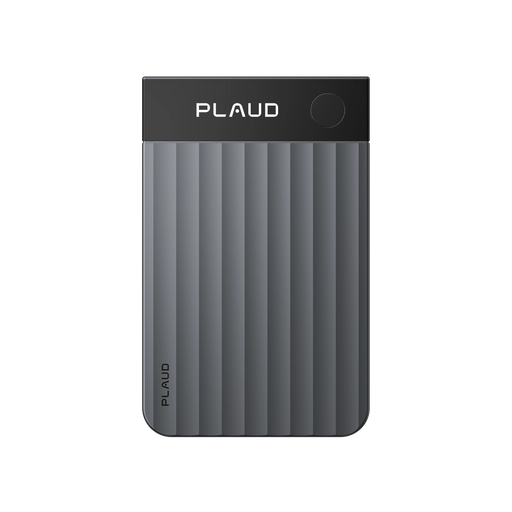
Plaud Note Pro magnetically snaps to the back of your iPhone using the included MagSafe case, so it rides with the device you already touch for meetings, phone calls, and quick voice memos. You skip the moment of hunting for a separate recorder while the thought is still hot.
After capture, it does not stop at audio. Plaud Intelligence automatically transcribes your notes, summarizes key takeaways with AI, and can generate mind maps so you visualize ideas instead of replaying long files.
The InstantView AMOLED display shows multiple functions and battery level when you need confidence at a glance. With up to 50 hours of recording time on one charge in Endurance mode, multi-stop days are less likely to end with a dead capture plan.
Creator review
Jsetups, a 3C and tech lifestyle creator , shows how the slim Plaud Note Pro snaps onto his iPhone. From meetings and phone calls to quick voice memos, it captures every word in crystal-clear audio.
Creator's vertical video review (Instagram)
Jsetups
Tech & good finds creator
Platform
Audience
Tech-savvy professionals and creators who live on iPhone and want one-stack capture
Scenario tested
MagSafe snap-on iPhone; meetings, phone calls, quick voice memos; AI takeaways and mind maps
"But here's what makes it unique. It doesn't just record. It automatically transcribes your notes, summarizes key takeaways with AI, and even generates mind maps to help you visualize your ideas."
— Jsetups, video at 00:13
The problem & the fix
The second a call or meeting ends, phrasing and next steps blur. You still hold your phone, but the window to capture structure cleanly is already closing.
Hunting for a separate recorder or juggling another app adds friction exactly when you need a fast voice memo. By the time you start, half the thought is gone.
Files pile up. When you review, you scrub long takes and still miss the key takeaways a summary would surface in minutes, so prep stays slow.
Plaud Note Pro magnetically snaps to your iPhone with the included MagSafe case, so it stays with you from meetings to calls to memos without a second device ritual.
It does not just record. It automatically transcribes your notes, summarizes key takeaways with AI, and generates mind maps to help you visualize ideas after the fact.
After any session, the Plaud App surfaces transcripts, AI summaries, and mind maps — so you scan structured notes instead of scrubbing long files to find what you need.
Choose your AI note taker
Pick the device shape that fits meetings, calls, and quick voice memos on your iPhone
Jsetups's pick
Best for meetings, calls, and quick voice memos on iPhone, MagSafe snap-on and dual-mode capture
£169
Shop now Wearable capture
Best for meetings, calls, and quick voice memos on iPhone, wearable hands-free capture
£159
Shop nowCreator story
Jsetups x Plaud Note Pro
Before framing Plaud Note Pro as part of an iPhone stack, the pain is familiar: meetings, calls, and stray ideas all compete for the same attention. A separate recorder or a messy voice memo folder means either extra gear or extra hours turning audio into something you can brief from.
In the video, Jsetups positions the hardware in one line: a tiny slim device that magnetically snaps to the back of your iPhone using the included MagSafe case. From there, the same flow covers meetings and phone calls to quick voice memos with crystal clear audio, so capture stays tied to the phone already in hand.
The payoff is not only the recording. It doesn't just record — it automatically transcribes your notes, summarizes key takeaways with AI, and generates mind maps to help you visualize your ideas, while the AMOLED display and up to 50 hours of recording time back a full-day story.
"Now this is truly the future of smart note taking."
Jsetups
Tech & good finds creator · video at 00:28
2.5M
Users globally
10,000+
Influencers advocacy
200+
Media endorsements
Expert playbook
Master capture from meetings, calls, and memos with this step-by-step guide.
Pair hardware to your iPhone workflow so the first meeting, call, or memo of the day starts without setup drama.
Keep the phone natural in hand while the device captures meetings, calls, and quick memos with clear audio.
Move from audio to outlines — transcripts, key takeaways, and mind maps — without replay marathons.
Turn repeat meetings and recurring calls into a searchable stack on top of Plaud Intelligence.
Why Plaud
Plaud Note Pro keeps capture on the iPhone you already carry and hands back transcripts, summaries, and mind maps.
The included MagSafe case lets Plaud Note Pro magnetically snap to the back of your iPhone so you are not routing through a second gadget list. Smart dual-mode recording adapts between call and in-person contexts without pulling you into a new habit.
Plaud Intelligence supports transcription in 112 languages, speaker-aware output, and 10,000+ summary templates — so you move from crystal clear audio to briefs and mind maps faster than manual notes after long calls.
Enterprise-grade commitments include AES-256 encryption, TLS 1.3, SOC 2, HIPAA, GDPR, and EN18031 compliant practices — so client calls and internal meetings stay within a controlled stack, not scattered across unsecured apps.
Real reviews
Hear from verified users who transformed their note-taking with Plaud Note Pro.
I enjoy the pro model, the transcription onto the app, the summary, the support.
Amazing how it transcribes and does outlines ... looking forward to learning more
I'm using my Plaud Note Pro daily, and am totally happy with it! It's accurate, easy to use... Not one regret!
Wonderful addition to my Plaud device. I love the low profile and the way it adheres to my phone even with a case.
FAQ
Answers to common questions about using Plaud Note Pro for iPhone note-taking.
Yes. Plaud Note Pro is a tiny slim device that magnetically snaps to the back of your iPhone using the included MagSafe case, so it stays on the handset you already carry. Smart dual-mode recording switches between phone-call and in-person capture as you move between calls and meetings.
No — not if you use the full workflow. After you record, the Plaud App turns audio into automatic transcription, AI summaries of key takeaways, and optional mind maps, so you can skim structured output instead of replaying long files when you need the gist of a meeting or memo.
Plaud Note Pro supports up to 50 hours of recording on a single charge in Endurance mode, with an InstantView AMOLED display for quick status checks. That helps you get through stacked meetings, calls, and quick memos without mid-day anxiety.
Plaud publishes enterprise-grade controls including AES-256 encryption, TLS 1.3, SOC 2, HIPAA, GDPR, and EN18031 compliant commitments — appropriate for sensitive conversations when you choose an AI note taker tied to your phone workflow.
Built-in voice memos capture audio but stop there. Plaud Note Pro adds AI transcription, summaries, and mind maps on top of the recording — so a quick memo becomes searchable structured notes, not just a file you have to replay later.
Keep exploring
More guides and insights for smarter note-taking.
Covers consent and practical setup before you rely on any recorder for calls or in-person dialogue — a useful baseline for iPhone-first capture.
Explore →Explains how AI transcription turns meetings and memos into searchable text so key takeaways are easier to extract than from raw audio alone.
Explore →When part of your day is still face to face, this guide pairs well with hardware that captures room audio clearly before AI summarization.
Explore →
Fast Shipping
Ship out within 1-2 business days

Free 30-Day Return
No reason needed. Free return shipping & full refund.

One-Year Warranty
Warranty period subject to local laws

Lifetime Customer Support
Quick support within 24 hours on working days
Before you record, take a moment to let others know and get their okay. Thanks for being mindful of privacy and local laws.
Trending Search

Trending Search
Suggested Searches
Popular Products